LangChain Deep Agents: The Blueprint for Mastering Complex AI Workflows
A Deep Dive into Stateful Planning, Sub-agent Delegation, and Persistent Context Management

The landscape of AI agents is rapidly maturing. We’ve moved past the initial excitement of single-tool calls and are now facing a more profound challenge: building agents that can tackle complex, multi-step tasks requiring long-term planning, context management, and specialized skills. Traditional agent loops, often stateless and myopic, falter when faced with workflows that a human would tackle with a to-do list, a file system, and a team of specialists.
Enter the “Deep Agent” architecture. This isn’t a specific product but a powerful architectural pattern for building sophisticated agents that can reason, plan, and execute over extended interactions. It’s a move away from a simple “Reason-Act” loop towards a more robust “Plan-Delegate-Execute-Synthesize” cycle.
In this deep dive, we’ll dissect the core components of this architecture, using a from-scratch implementation to illustrate not just the ‘what,’ but the ‘how’ and ‘why.’ We’ll explore how to build agents that don’t just act, but strategize, using a combination of explicit planning, context offloading, and specialized sub-agents.
What Are Deep Agents and Why Do We Need Them?
A Deep Agent is an advanced agent architecture engineered for complexity. Unlike its “shallow” counterparts that process requests in a single, often limited context window, a Deep Agent is designed for sustained reasoning. It’s the difference between an AI that can answer a factual question and one that can conduct a comprehensive research project, write a report, and adapt its plan as new information comes to light.
The core limitations of simple agents are:
Context Overflow: Long conversations or complex tasks quickly exceed the context window of even the largest models, leading to forgotten instructions and lost information.
Lack of Strategic Planning: Without an explicit mechanism for planning, agents tend to take a greedy, step-by-step approach, often getting stuck in loops or failing to see the bigger picture.
Context Contamination: When a single agent is responsible for everything—planning, searching, coding, summarizing—its context becomes cluttered. Instructions for one task can bleed into and confuse another.
Deep Agents are designed to solve these problems through four key pillars: Detailed Prompts, Explicit Planning Tools, a Virtual File System, and Specialized Sub-agents.
The Four Pillars of a Deep Agent Architecture
Let’s break down the components that give Deep Agents their power, using our codebase as a guide.
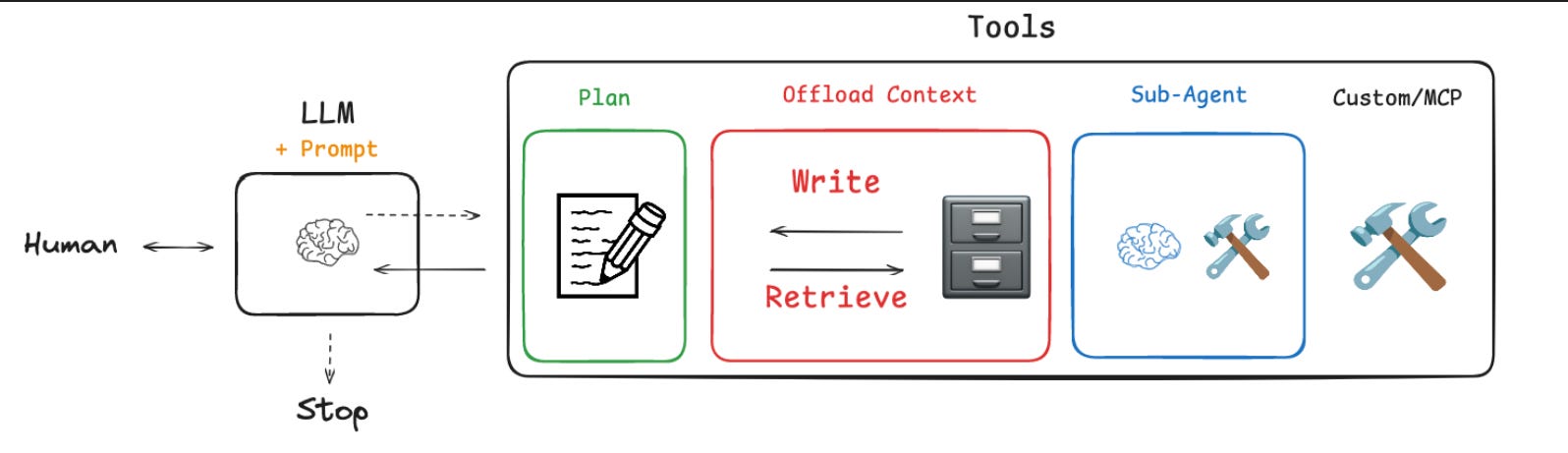
1. Detailed System Prompts: The Agent’s Constitution
The foundation of any capable agent is its “constitution”—a detailed system prompt that governs its behavior, constraints, and workflow. In our architecture, these prompts, found in prompts.py, are not just simple instructions but comprehensive operational guides.
For instance, the RESEARCHER_INSTRUCTIONS prompt establishes clear rules of engagement for a research task. It sets hard limits on tool calls to prevent runaway execution and enforces a crucial workflow: search, then reflect.
This level of detail moves the agent from a purely reactive system to one that follows a predefined, expert-driven methodology. It’s the first line of defense against chaotic, unpredictable behavior.
RESEARCHER_INSTRUCTIONS = “”“You are a research assistant...

<Hard Limits>
**Tool Call Budgets** (Prevent excessive searching):
- **Simple queries**: Use 1-2 search tool calls maximum
- **Normal queries**: Use 2-3 search tool calls maximum
- **Very Complex queries**: Use up to 5 search tool calls maximum
- **Always stop**: After 5 search tool calls if you cannot find the right sources
</Hard Limits>

<Show Your Thinking>
After each search tool call, use think_tool to analyze the results:
- What key information did I find?
- What’s missing?
- Do I have enough to answer the question comprehensively?
- Should I search more or provide my answer?
</Show Your Thinking>
“”“
2. Planning and Reflection Tools: Forcing Strategic Thought
To overcome the agent’s natural tendency for a greedy, step-by-step approach, we must equip it with tools that enforce planning and reflection. The codebase implements this in two ways.
First, the todo_tools.py module introduces a structured task list. The write_todos tool forces the agent to externalize its plan into a concrete artifact before it begins execution. This plan is stored in the agent’s state.
class Todo(TypedDict):
    content: str
    status: Literal[”pending”, “in_progress”, “completed”]

@tool(description=WRITE_TODOS_DESCRIPTION,parse_docstring=True)
def write_todos(
    todos: list[Todo], tool_call_id: Annotated[str, InjectedToolCallId]
) -> Command:
    “”“Create or update the agent’s TODO list for task planning and tracking.”“”
    return Command(
        update={
            “todos”: todos,
            “messages”: [
                ToolMessage(f”Updated todo list to {todos}”, tool_call_id=tool_call_id)
            ],
        }
    )
Second, the think_tool in research_tools.py creates a deliberate “pause” in the workflow. The system prompt for the researcher requires it to use this tool after each search. This simple tool, which just returns the reflection, forces the LLM to stop, analyze the results it has gathered, and articulate its next move.
# from deep_agents_from_scratch/research_tools.py

@tool(parse_docstring=True)
def think_tool(reflection: str) -> str:
    “”“Tool for strategic reflection on research progress and decision-making.

    Use this tool after each search to analyze results and plan next steps systematically.
    This creates a deliberate pause in the research workflow for quality decision-making.
    “”“
    return f”Reflection recorded: {reflection}”
Together, these tools transform the agent’s internal monologue into an explicit, stateful plan that can be observed, managed, and acted upon.
3. Virtual File System: Offloading Context for Infinite Memory
The most significant limitation of LLMs is the finite context window. The Virtual File System (VFS) directly addresses this. By providing the agent with tools to read (read_file), write (write_file), and list (ls) files, we give it a persistent, long-term memory.
The implementation in file_tools.py manages a dictionary in the agent’s state, where keys are filenames and values are their content.
# from deep_agents_from_scratch/state.py

class DeepAgentState(AgentState):
    “”“Extended agent state that includes task tracking and virtual file system.”“”
    todos: NotRequired[list[Todo]]
    files: Annotated[NotRequired[dict[str, str]], file_reducer]
The power of this pattern is showcased beautifully in the tavily_search tool. When the agent performs a web search, the tool doesn’t just return the raw text and clog the context. Instead, it processes the results, saves the detailed content of each page to the VFS, and returns only a minimal summary to the main conversation.
the detailed content of each page to the VFS, and returns only a minimal summary to the main conversation.

# from deep_agents_from_scratch/research_tools.py

@tool(parse_docstring=True)
def tavily_search(...) -> Command:
    # ... search logic ...
    processed_results = process_search_results(search_results)

    files = state.get(”files”, {})
    saved_files = []
    summaries = []

    for i, result in enumerate(processed_results):
        # ... create file content ...
        files[filename] = file_content
        saved_files.append(filename)
        summaries.append(f”- {filename}: {result[’summary’]}...”)

    # Create minimal summary for tool message
    summary_text = f”“”🔍 Found {len(processed_results)} result(s) for ‘{query}’:\n\n{chr(10).join(summaries)}\n\nFiles: {’, ‘.join(saved_files)}\n💡 Use read_file() to access full details when needed.”“”

    return Command(
        update={
            “files”: files,
            “messages”: [
                ToolMessage(summary_text, tool_call_id=tool_call_id)
            ],
        }
    )
This “context offloading” strategy is a game-changer. The agent’s primary context remains clean and focused on high-level strategy, while the VFS holds the rich, detailed information that can be retrieved on demand.
4. Sub-agents: Specialization and Context Isolation
The final pillar is the ability to delegate. Complex tasks often require different skills or mindsets. A coordinating agent managing a high-level plan shouldn’t be bogged down with the specifics of web research. The task_tool.py module implements a powerful pattern for spawning specialized sub-agents.
The key innovation here is context isolation. When the main agent delegates a task, it doesn’t just pass control; it spawns a completely new agent instance with a clean context containing only the task description.
This is the magic line in task_tool.py:
# from deep_agents_from_scratch/task_tool.py

# ... inside the ‘task’ tool ...
# Create isolated context with only the task description
# This is the key to context isolation - no parent history
state[”messages”] = [{”role”: “user”, “content”: description}]

# Execute the sub-agent in isolation
result = sub_agent.invoke(state)
This prevents context contamination. The sub-agent (e.g., a “research-agent”) operates with a pristine prompt and history, focused solely on its specific job. It has its own tools (or a subset of them) and its own instructions. When it finishes, its results (like new files in the VFS) are merged back into the main agent’s state, allowing the coordinator to synthesize the findings and proceed with the master plan. This mimics a real-world manager delegating to a team of specialists.
Assembling the Deep Agent with LangGraph
These four pillars are not standalone features but interconnected components of a stateful graph. The entire architecture is orchestrated using LangGraph, a library for building robust, cyclical agent runtimes.
Here’s a high-level view of how they come together:
Define State (state.py): We start by defining a DeepAgentState graph state that includes our todos list and files dictionary. This state will be passed to every node in our graph.
Implement Tools (file_tools.py, research_tools.py, etc.): Each tool is designed to interact with the DeepAgentState. They receive the current state, perform their action, and return a Command object that specifies how the state should be updated.
Configure the Coordinator (task_tool.py): The task tool is special. It acts as a gateway to other agents. It’s configured with a list of available sub-agent types, each with its own prompt and toolset. Internally, it uses create_react_agent from LangGraph to dynamically instantiate these specialists.
Build the Graph: Using LangGraph, we wire these components together. The graph consists of nodes that execute the agent’s logic (deciding which tool to call) and edges that route the flow based on the outcome. The state is persisted and passed between each step, allowing the agent to track its plan, manage its file system, and integrate results from sub-agents over many cycles.
Let’s walk through a quick example: “Research the latest advancements in quantum computing and compare them to classical computing.”
Planning: The main agent receives the request. Its first action is to call write_todos to create a plan: [{content: “Research quantum computing advancements”, status: “pending”}, {content: “Research classical computing limitations”, status: “pending”}, {content: “Synthesize findings into a comparative report”, status: “pending”}].
Delegation: The agent executes the plan. It might identify two parallel research tracks. It makes two tool calls to task in a single turn:
task(description=”Find recent breakthroughs in quantum computing from the last 2 years.”, subagent_type=”research-agent”)
task(description=”Summarize the primary computational limitations of classical computing.”, subagent_type=”research-agent”)
Execution (in Isolation): Two separate research-agent instances are spawned. Each has a clean context. They use the tavily_search tool, which saves detailed articles to the VFS (e.g., quantum_breakthroughs_2024.md, classical_computing_limits.md). The tool returns only a brief summary to its sub-agent.
Synthesis: The main coordinating agent receives confirmation that the tasks are complete and sees the new files in the VFS via ls(). It updates its TODO list, marking the research tasks as “completed.” It then proceeds to the final task: it calls read_file on both documents, synthesizes the information, and uses write_file to create a final comparative_report.md.
Real-World Applications and the Future
This architecture isn’t just a theoretical exercise. It’s a blueprint for building powerful, real-world AI systems:
Automated Financial Analysis: An agent could be tasked with generating a quarterly report. It would spawn sub-agents to fetch stock data, parse financial statements from SEC filings, analyze news sentiment, and then synthesize it all into a structured document.
Autonomous Codebases: A “software engineering” agent could manage a project. It would use its TODO list to track features, its VFS to manage the code, and delegate tasks like “write unit tests for module.py” or “refactor the database schema” to specialized coding sub-agents.
Enterprise Automation: In a business setting, an agent could automate complex processes like customer onboarding, which involves checking different internal databases, generating documents, and sending notifications—all steps that can be handled by specialized sub-agents coordinated by a master plan.
By moving beyond simple ReAct loops and embracing state, planning, and specialization, we unlock a new class of AI capabilities. The Deep Agent architecture provides a robust and scalable pattern for building agents that can reason and work on problems with the same level of complexity that we humans handle every day. The future of AI is not just about having a conversation; it’s about getting the job done.
This article code has been taken from deep agent langchain GitHub url: Code